How to clean a Samsung TV screen safely
How to Safely Clean Your Samsung TV Screen Without Damage
To safely clean your Samsung TV screen, always use a soft, lint-free microfiber cloth and avoid harsh chemicals. Fingerprints and smudges can be removed with a small amount of water or isopropyl alcohol applied to the cloth, never directly on the screen. Using improper cleaning tools or substances can scratch the surface or damage the anti-glare coating.
1. What You Need to Clean Your Samsung TV Screen
Before cleaning your Samsung TV screen, gather the following:
- A soft, lint-free microfiber cloth
- Distilled water or isopropyl alcohol (70% or less)
- Optional: A second dry microfiber cloth for drying
2. Why Is It Important to Clean Your Samsung TV Screen Properly?
- Harsh chemicals like ammonia, benzene, or window cleaners can strip the anti-glare coating, reducing screen clarity.
- Abrasive materials such as paper towels or sponges can leave permanent scratches on the screen.
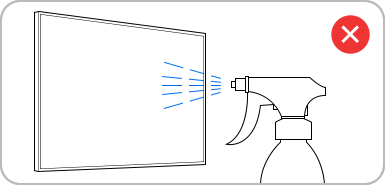
- Water or cleaning solutions sprayed directly onto the screen can seep into the TV, causing electrical damage or safety hazards.
3. How to Clean Fingerprints and Greasy Smudges Off Your Samsung TV Screen
For everyday fingerprints and smudges, follow these steps:
- Turn off your Samsung TV to make smudges easier to see.
- Lightly dampen a corner of your microfiber cloth with distilled water or isopropyl alcohol.
- Gently wipe the affected area in circular motions.
- Use a dry part of the cloth to buff away moisture and streaks.
4. What to Do If Your Samsung TV Screen Has Stubborn Stains
If regular cleaning doesn't remove stubborn marks, try this method:
- Dampen a microfiber cloth with a small amount of isopropyl alcohol (70% or less).
- Gently wipe the stain in circular motions, applying light pressure.
- Immediately follow up with a dry microfiber cloth to prevent residue buildup.
- Avoid excessive pressure, as it can damage the screen's anti-reflective layer.
- Never use scouring pads, razor blades, or sharp objects to scrape off debris.
5. Additional Things to Check When Cleaning Your Samsung TV
Ensure your cleaning routine includes these considerations:
- Always power off and unplug your TV before cleaning to avoid electrical risks.
- Clean the TV frame and bezel with a dry microfiber cloth to remove dust buildup.
- Regularly dust your TV to prevent particles from settling on the screen.
6. Supported Samsung TV Models
These cleaning guidelines apply to most Samsung TVs, including:
- Galaxy S Series TVs (S24, S25, S26)
- QLED TVs
- Neo QLED TVs
- MicroLED TVs
- Crystal UHD TVs
7. Related Samsung Support Topics
Thank you for your feedback!
Please answer all questions.