Director's View Missing in Camera?
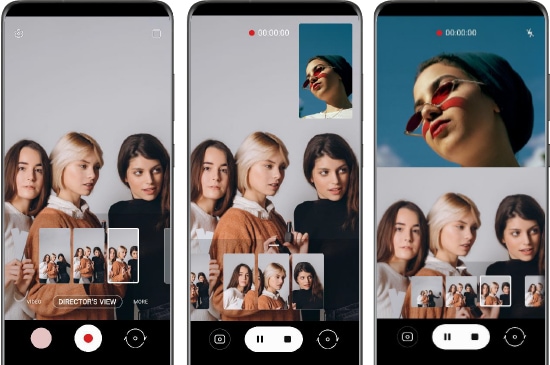
Why can't I see the Director's view menu in the camera options?
The Director's view menu has been renamed to Dual recording in newer Samsung Galaxy devices, offering enhanced functionality and more intuitive options for recording with multiple cameras simultaneously. If you're unable to locate the Director's view menu, it's likely because the feature has been rebranded and relocated within the camera app.
1. Why the Director's view menu is no longer visible
Samsung has updated the Director's view feature to improve usability and expand recording options. The menu has been renamed to Dual recording, which now includes additional settings for resolution, frame rate, and camera combinations. This change ensures a more streamlined experience while maintaining the core functionality of recording with multiple cameras at once.
2. How to access Dual recording on your Samsung Galaxy device
Follow these steps to access the Dual recording feature on your Samsung Galaxy device:
- Open the Camera app on your Samsung Galaxy device.
- Tap the More option, usually represented by three dots or a similar icon.
- Select Dual recording from the menu that appears.
- Customize the settings by choosing your preferred FPS (frames per second) and resolution options.
3. Available Dual recording options
Dual recording offers several configurations to suit your needs. Here are the available options:
- FHD/UHD 30fps
- Front + Rear Camera
- Rear + Rear Camera
Note: On the Galaxy S23 series, the available options were limited to FHD 30fps and Front + Rear Camera. Newer models, such as the Galaxy S24, Galaxy S25, and Galaxy Z Fold series, offer expanded options for higher resolutions and frame rates.
4. Supported Samsung Galaxy devices
Dual recording is supported on the following Samsung Galaxy devices:
- Galaxy S24 series
- Galaxy S25 series
- Galaxy Z Fold series
- Galaxy Z Flip series
- Galaxy A series (select models)
5. Additional things to check
If you still cannot find the Dual recording option, consider the following:
- Ensure your device is running the latest software version. Updates often introduce new features or relocate existing ones.
- Check if the Camera app is up to date. Older versions may not support the updated Dual recording feature.
- Verify that your device model supports Dual recording. Some older models may not have this feature.
Related Samsung support topics
Thank you for your feedback!
Please answer all questions.