How Do I Use the Galaxy Ring?
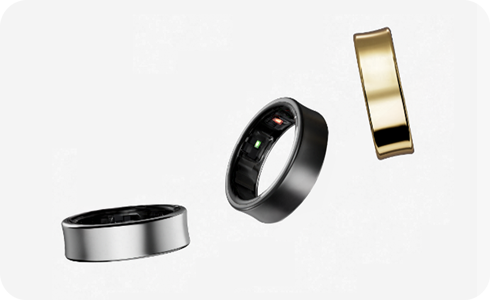
The Samsung Galaxy Ring is designed to help you monitor your health by tracking vital signs, activity patterns, and sleep quality. It syncs seamlessly with the Samsung Health app to provide detailed insights into your wellness. Follow this guide to learn how to set up, use, and maintain your Galaxy Ring effectively.
1. How to Set Up Your Samsung Galaxy Ring
To get started with your Galaxy Ring, follow these steps:
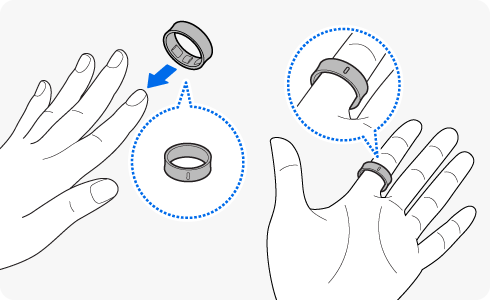
- Wear the Ring Correctly: Place the ring on your finger with the orientation indicator facing your palm. Ensure it fits comfortably—not too tight or loose.
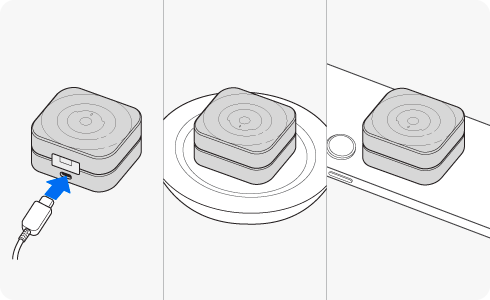
- Charge the Ring: Place the ring in its charging case. If the battery indicator doesn't light up, connect the case to a power source and charge for at least 10 minutes.
- Download the Galaxy Wearable App: Ensure the latest version of the Galaxy Wearable app is installed on your mobile device. You can download it from the Galaxy Store.
- Pair via Bluetooth: Connect your ring to your phone using the Galaxy Wearable app or navigate to Settings > Connections > Bluetooth on your device.
2. Charging Your Galaxy Ring
The Galaxy Ring supports wired charging, wireless charging, and wireless power sharing. Here's how to charge it:
- Place the ring in its charging case, aligning the orientation indicator with the marker on the case.
- Connect the case to a power source if the battery indicator doesn't light up.
- Once charged, the ring will automatically start working.
3. Checking Battery Level
You can monitor your ring's battery status using the charging case's indicator light or the ring's battery status light. If connected to your phone, check the battery level in the Galaxy Wearable app.
4. Understanding the Ring's Sensor Lights
- All lights flash and turn off: Welcome lighting when opening the charging case.
- Flashes clockwise in sequence: Displays remaining battery level.
- Flashes clockwise and blinks at the end: Indicates charging status.
- All lights flash: Fully charged.
- All lights blink: Charging error.
- Spins clockwise continuously: Bluetooth pairing mode.
5. Measuring Health Data and Features
Your Galaxy Ring tracks various health metrics, including:
- Energy Score: Analyzes heart rate, activity, and sleep to provide wellness guidance.
- Sleep Analysis: Measures heart rate, blood oxygen, and skin temperature during sleep.
- Menstrual Cycle Tracking: Predicts ovulation dates based on skin temperature (for personal reference only).
- Activity Monitor: Automatically detects and records steps, exercise time, and calories burned.
- Stress Monitor: Tracks stress levels using biodata and offers breathing exercises.
6. Usage Notices and Troubleshooting
Follow these guidelines to ensure optimal use of your Galaxy Ring:
- Avoid wearing the ring during heavy lifting or exercises involving gripping hard objects.
- Keep your finger and ring clean and dry before wearing.
- Remove the ring if you experience skin irritation and consult a healthcare professional.
- Do not use an ultrasonic cleaner to clean the ring, as it may damage the sensors.
7. Supported Samsung Galaxy Devices
The Galaxy Ring is compatible with most Samsung Galaxy smartphones, including the Galaxy S24, Galaxy S25, Galaxy Z Fold, Galaxy Z Flip, and Galaxy A series. Ensure your device runs the latest software version for optimal performance.
Related Samsung Support Topics
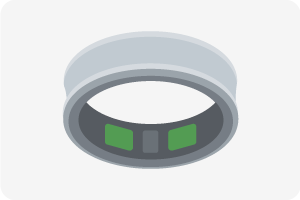
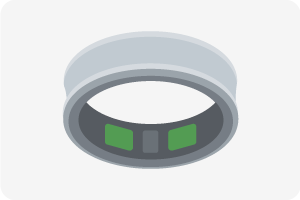
Blinking green light: Battery level ≥ 15%


Blinking red light: Battery level < 15%
Thank you for your feedback!
Please answer all questions.