How to Adjust the Temperature on a Refrigerator
How to Adjust Temperature on Samsung Refrigerator
To adjust the temperature on your Samsung refrigerator, locate the temperature control panel specific to your model. Whether you have a top mount, BESPOKE, or French Door refrigerator, follow the steps below to ensure your fridge and freezer maintain ideal temperatures—typically 3°C (38°F) for the fridge and -19°C (-2°F) for the freezer.
1. Why Adjust Refrigerator Temperature?
Adjusting the temperature ensures food stays fresh longer and prevents spoilage due to improper cooling. Common reasons for temperature adjustments include seasonal changes, power fluctuations, or personal preference for stronger or weaker cooling.
- Seasonal temperature changes can affect cooling efficiency.
- Improper settings may cause food to freeze in the fridge or fail to freeze in the freezer.
- Power surges or interruptions may reset temperature controls.
2. Supported Samsung Refrigerator Models
This guide applies to:
- Top Mount Refrigerators
- BESPOKE Refrigerators
- French Door Refrigerators
3. How to Adjust Temperature on Top Mount Refrigerators
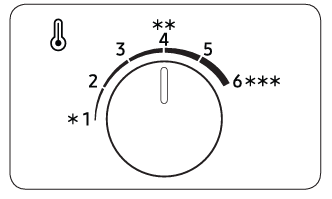
Top mount refrigerators feature manual dials for temperature control. Follow these steps:
- Locate the temperature control dials for the fridge and freezer compartments.
- Set the fridge dial to "Optimal" or ** (4) for standard cooling.
- For stronger cooling, set the fridge dial to 5-6.
- For weaker cooling, set the fridge dial to 1-2.
- Adjust the freezer dial to "Optimal" for ice production in summer.
- Slide the freezer dial to the right to increase temperature or to the left to decrease it.
- During winter, set the freezer dial to the right-most position.
4. How to Adjust Temperature on BESPOKE Refrigerators
BESPOKE refrigerators feature digital controls for precise temperature adjustments. Follow these steps:
- Tap any button to activate the display.
- Press "<" or ">" until you reach "Fridge / Freezer."
- Press the confirmation button to proceed.
- Set the fridge temperature between 1°C and 7°C.
- Set the freezer temperature between -23°C and -15°C.
5. How to Adjust Temperature on French Door Refrigerators
French Door refrigerators use touch controls for temperature adjustments. Follow these steps:
- Tap any button to wake up the display if it's asleep.
- Tap until the fridge or freezer indicator blinks.
- Press "<" or ">" to select the desired temperature or function.
- Wait for 5 seconds or tap again to confirm your selection.
6. Additional Things to Check
Ensure proper temperature maintenance by checking:
- Door seals for leaks that may affect cooling efficiency.
- Power supply stability to prevent temperature fluctuations.
- Regular cleaning of condenser coils to maintain optimal performance.
7. When Updates May Not Appear
Temperature adjustments may not take effect immediately due to:
- Delayed cooling cycle activation.
- High ambient room temperature affecting cooling efficiency.
- Overloading the fridge or freezer with warm items.
8. Related Samsung Support Topics
Thank you for your feedback!
Please answer all questions.